Music Intelligence & Creative Curation vs. Library Management
Your music library is one of your most valuable assets as a DJ. But having thousands of tracks doesn't necessarily mean you can find the right music when you need it.
As your collection grows, so do the challenges. You need to organize your records, keep your metadata consistent, discover new music, find tracks that work together, and prepare sets that make sense on the dancefloor.
Djoid and Lexicon both help DJs work with their music libraries, but they approach the job differently.
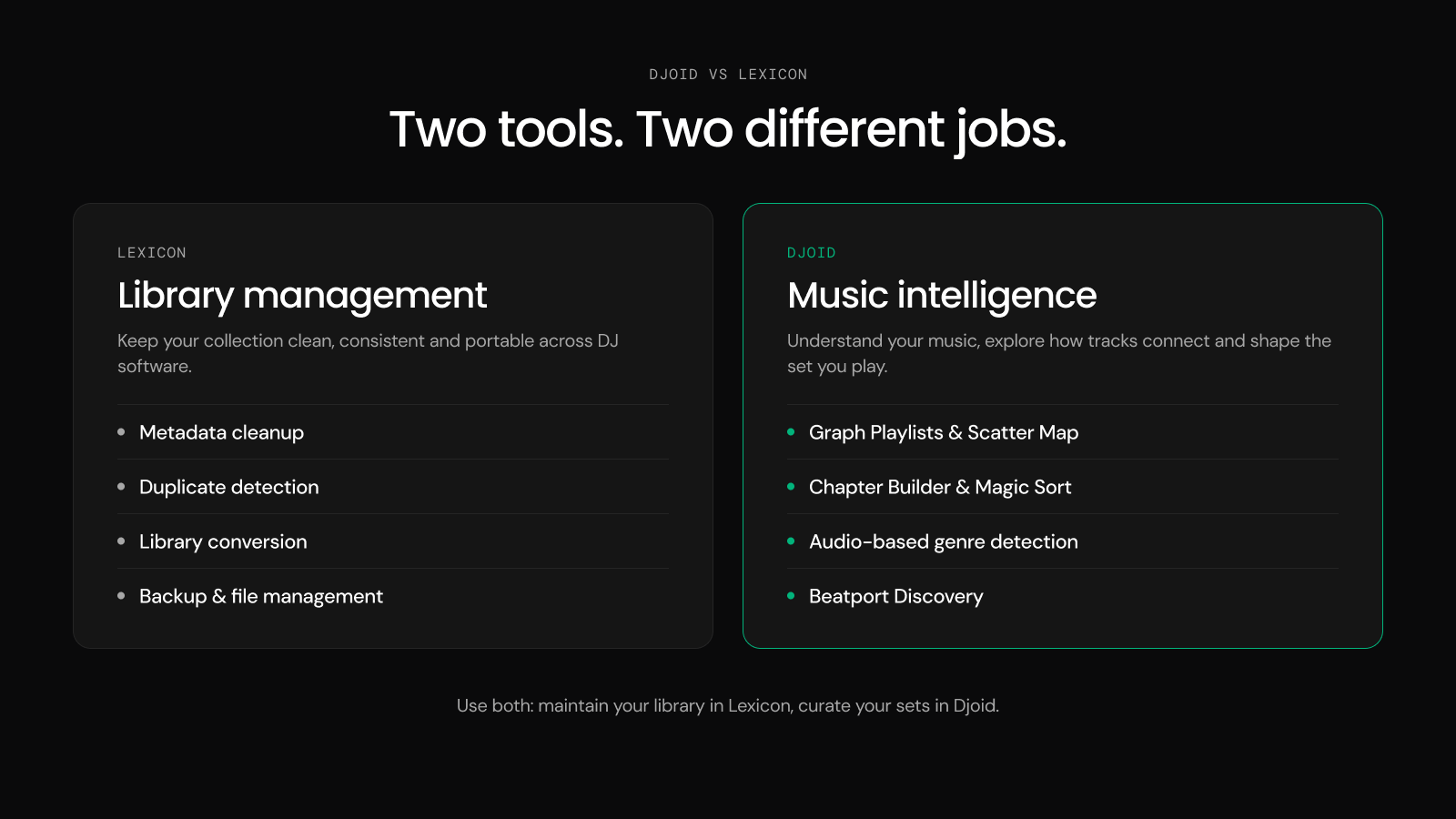
Lexicon specializes in library management, maintenance, and compatibility between DJ platforms.
Djoid specializes in music intelligence, visual exploration, discovery, and creative set preparation.
Both are useful tools. The right choice depends on what you need from your music.
What Is Lexicon? DJ Library Management Explained
Lexicon is a DJ library management application designed to help DJs organize, clean, maintain, and transfer their music collections across different DJ platforms.
If you have thousands of tracks spread across Rekordbox, Serato, Traktor, or other DJ software, Lexicon provides tools to bring everything into a more consistent and manageable structure.
Lexicon's Main Features
| Feature | What it does for DJs |
|---|---|
| Library Conversion | Transfer playlists, cue points, beatgrids, and other supported data between DJ platforms |
| Metadata Management | Edit track information, genres, artists, tags, and other metadata |
| Duplicate Detection | Find duplicate tracks using audio signatures or metadata |
| Smartlists | Automatically organize music into playlists based on rules |
| Library Backup | Back up your DJ library database, with cloud options |
| File Management | Identify missing or broken tracks, relocate files, and maintain folder structures |
| Automatic Cue Points | Generate cue points using customizable settings |
| BPM, Key & Energy Analysis | Analyze musical properties to support preparation and organization |
| Mixable Tracks | Suggest tracks from your existing collection based on compatibility rules |
| Music Discovery | Find new tracks based on your existing library |
| Track Matcher | Match external tracklists and supported playlists against your collection |
| Mobile App | Manage playlists and edit certain library information on mobile devices |
Some features are available only on specific Lexicon subscription plans.
Example: You've Been DJing for 10 Years and Your Library Is a Mess
Imagine you've collected 20,000 tracks over the last decade. You have:
- Duplicate records in different folders.
- Inconsistent genre tags.
- Missing files after changing computers.
- Playlists spread across multiple DJ applications.
- Cue points that need to be maintained.
Lexicon is particularly useful here. You can scan for duplicates, consolidate metadata, locate missing tracks, create automated playlists, and synchronize your library across supported DJ software.
Lexicon's strength is making your music collection easier to maintain and manage.
It also includes discovery and mixing-related tools, but its primary identity remains DJ library management.
What Is Djoid? Music Intelligence and Creative Curation Explained
Djoid is a music intelligence and curation platform designed to help DJs understand, explore, discover, and creatively organize their music.
Instead of treating your library only as a collection of files, Djoid analyzes musical characteristics and reveals relationships between records. It helps answer questions DJs regularly face:
- Which tracks in my collection would work well together?
- Where are the forgotten records that fit the sound I'm preparing?
- How can I build a set with a natural progression in energy and mood?
- Which tracks belong together, even when they're labeled as different genres?
- How can I discover new music that fits the playlist I'm working on?
Djoid is designed around the creative work that happens before stepping into the DJ booth.
Djoid's Main Features
| Feature | What it does for DJs |
|---|---|
| Graph Playlists | Visually explore compatible tracks and build playlists through musical relationships |
| Scatter Map | Navigate your collection as an interactive landscape of energy, similarity, and other musical characteristics |
| Chapter Builder | Structure complete sets into chapters based on mood, energy, and musical direction |
| Magic Sort | Arrange tracks using harmonic compatibility, energy, and musical progression |
| Auto Group / Auto Crates | Automatically group records by musical characteristics, similarity, or other criteria |
| Matching Tracks | Find compatible records from your collection while preparing playlists |
| Genre & Subgenre Detection | Analyze audio to identify genres and subgenres |
| Beatport Discovery | Discover new Beatport tracks based on your library and the playlist you're currently curating |
| Automatic Cue Points | Detect and prepare cue points for tracks |
| DJ Software Integration | Import music from supported DJ software and export prepared playlists for performance |
The difference becomes especially interesting when we look at real DJ workflows.
5 Real DJ Workflows: When to Use Djoid or Lexicon
1. Finding the Right Tracks in a Large Music Library
Scenario: You're preparing a deep house set and have 15,000 tracks in your collection. You remember having some beautiful, hypnotic records that would fit the opening. But you can't remember their names, artists, or which folders you saved them in.
With Lexicon
You can search your library, filter by tags, BPM, key, energy, or other available fields, and build Smartlists that automatically collect tracks matching specific rules. If your library is consistently tagged, this is a powerful way to retrieve music.
With Djoid
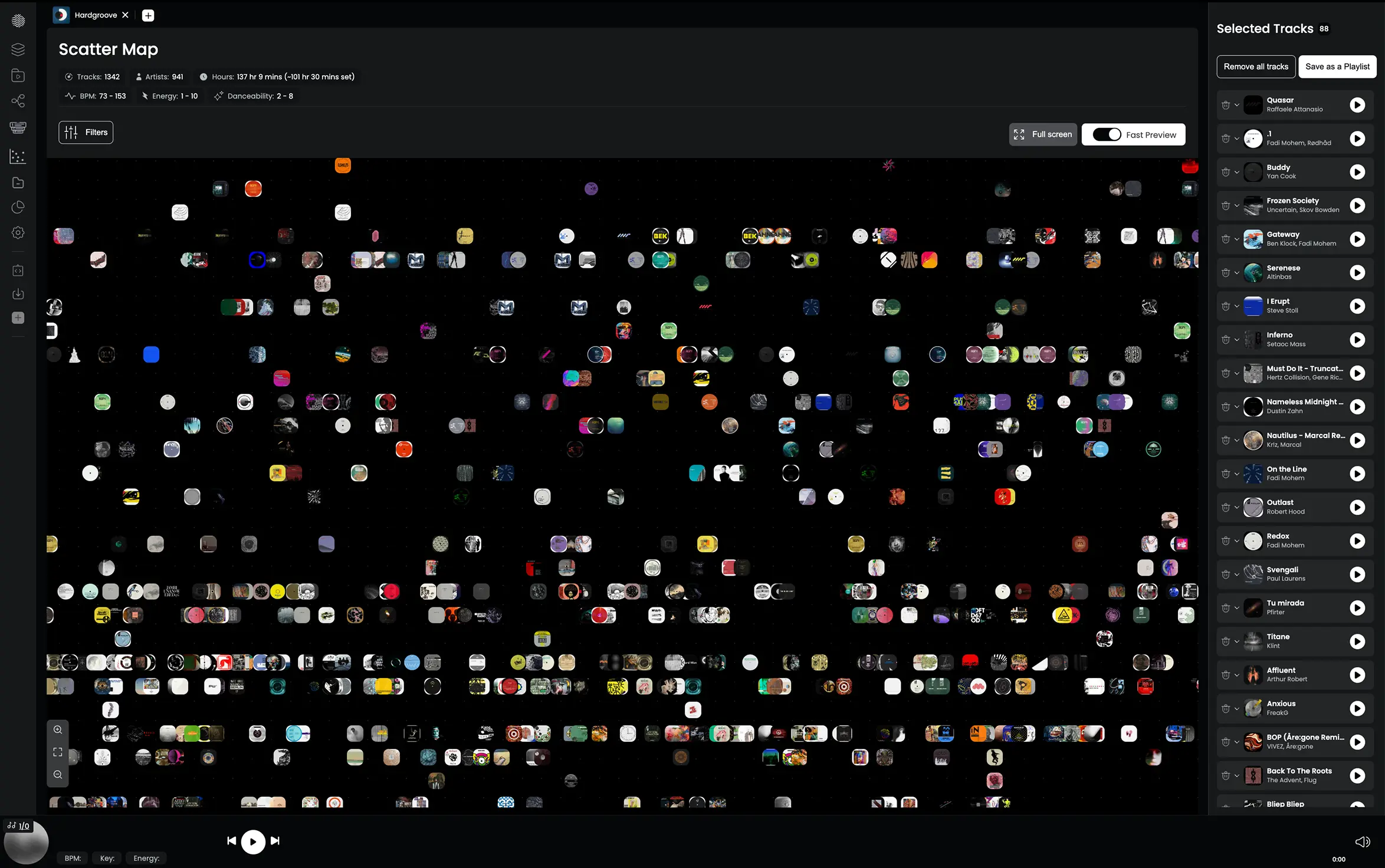
You can open Scatter Map and explore your collection visually. Tracks are positioned according to their musical characteristics, making it possible to identify clusters of music with similar qualities.
You might find an area containing deep, hypnotic records, preview them quickly, and select tracks that fit the sound you're looking for. You can also start with a particular record and use Graph Playlists to explore compatible music around it.
The difference: Lexicon helps you find music through structured information and rules. Djoid adds a visual, similarity-driven way to discover music, including tracks you may have forgotten.
2. Preparing a DJ Set That Tells a Story
Scenario: You're playing a three-hour underground house set. You want to start with a warm, hypnotic atmosphere, gradually introduce more rhythmic tension, reach an energetic peak, and finish with something emotional.
You have plenty of good records. The challenge is choosing the right ones and shaping their progression.
With Lexicon
You can organize candidate tracks into playlists, use Mixable Tracks to find compatible selections, and take advantage of key, BPM, and energy information. You can then arrange the music manually and transfer it to your performance software.
With Djoid
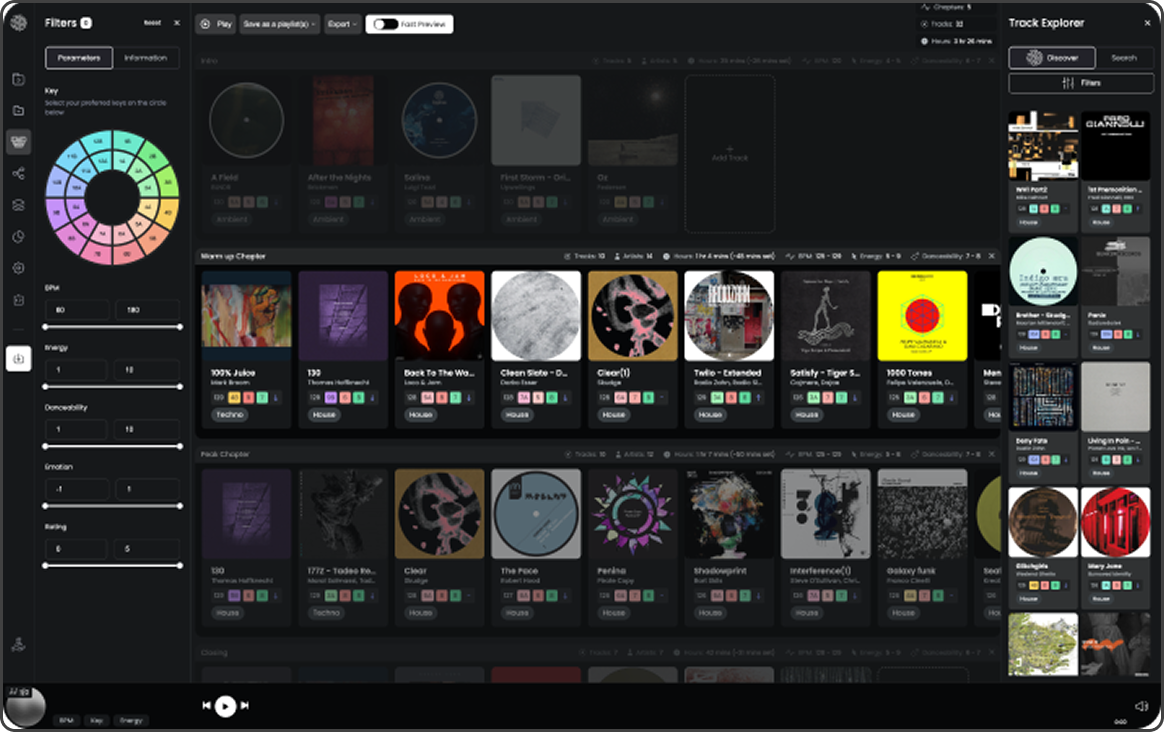
You can use Chapter Builder to divide your set into meaningful musical moments. For example:
- Chapter 1 — Warm & Hypnotic: Deep grooves, spacious arrangements, and subtle movement.
- Chapter 2 — Building Tension: Stronger rhythms, growing energy, and more driving basslines.
- Chapter 3 — Peak Time: Powerful records with a focused, energetic character.
- Chapter 4 — Emotional Closing: Melodic, warm, or reflective records that bring the journey to a close.
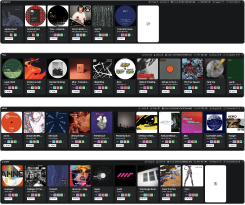
Within each chapter, Djoid helps you discover compatible tracks from your collection. Graph Playlists can help explore musical connections, while Magic Sort can suggest a more coherent progression through your selections. Once you're satisfied, you can export the prepared structure to your DJ software.
The difference: Lexicon provides tools to organize and prepare playlists. Djoid provides a dedicated environment for designing the musical journey itself.
3. Discovering New Music That Fits Your Sound
Scenario: You're preparing a techno set for Saturday. You've already selected 25 records, but something is missing. You want a few fresh tracks that fit the sound you're building without spending hours browsing releases.
With Lexicon
Lexicon offers music discovery based on your collection. It also provides charts and store links to help you find music. These features can help you discover releases and locate tracks to purchase.
With Djoid
You can start directly from the playlist you're preparing. Through its Beatport integration, Djoid uses your library and current playlist as context to find relevant music.
It considers characteristics such as subgenre, artists, labels, scene, undergroundness, and sonic identity to identify suitable Beatport releases. You can quickly preview candidates, explore new artists, and add records you like to your Beatport cart.
For example, if you're preparing a playlist of hypnotic, percussive techno, Djoid can use that selection to guide discovery rather than requiring you to begin with a generic genre search.

The difference: Both platforms offer ways to discover music. Djoid places particular emphasis on discovering tracks in the context of the music you're curating right now.
4. Organizing Thousands of Tracks Without Spending Days Tagging
Scenario: You've imported 5,000 new tracks over the last few months. They come from different labels, stores, and collections. Some are badly tagged, and many could fit several musical categories.
With Lexicon
You can clean metadata, standardize genre names, edit tags in bulk, identify missing information, and use Smartlists to organize records automatically. This is particularly useful when consistency and library maintenance are the priority.
With Djoid
Djoid analyzes the audio itself to identify musical characteristics, including genre, subgenre, energy, and other properties. With Auto Group, you can organize music into groups based on shared musical characteristics.
Rather than relying exclusively on the metadata attached to each file, you can explore categories that reflect how the music sounds. A record labeled simply 'House' might belong musically with a group of deeper, groovier tracks rather than your peak-time house selections. Djoid can help reveal those relationships.
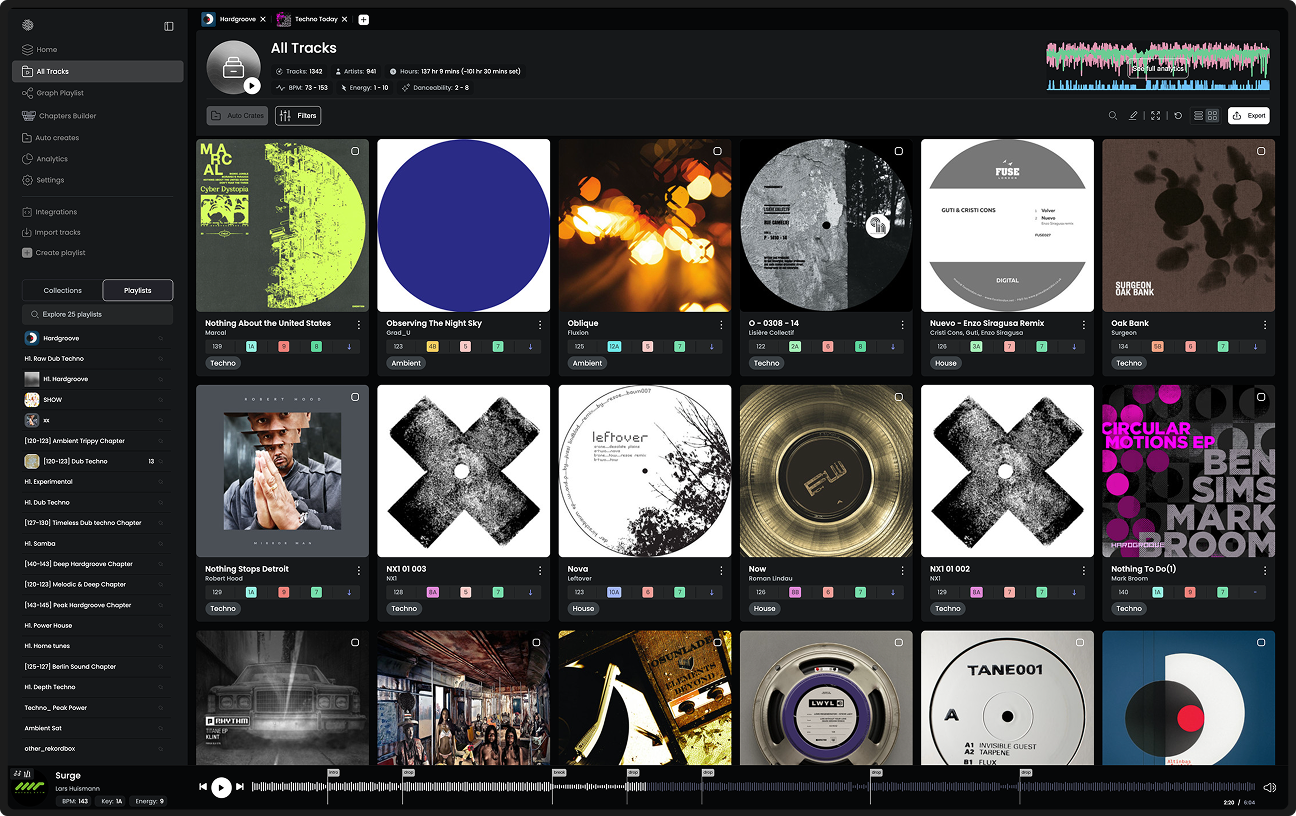
The difference: Lexicon is particularly strong at cleaning and maintaining existing library information. Djoid uses audio intelligence to add musical context and generate useful ways of grouping your collection.
5. Finding the Next Track When You're Creatively Stuck
Scenario: You're building a playlist and find a record you love. You know exactly how it feels and where it belongs in your set. But you're struggling to find another record that continues the same musical direction.
With Lexicon
The Mixable Tracks feature can suggest compatible records from your collection. Its default matching considers key and BPM, while additional rules let you refine the results using library information.
With Djoid
You can open the record in Graph Playlists and explore a network of compatible tracks. Instead of working only through a linear list, you can explore different musical directions around your starting record. You might discover:
- A track that maintains the same hypnotic atmosphere.
- A record that introduces more energy without radically changing the mood.
- A forgotten record with a similar musical character.
- An unexpected combination between tracks from different genres.
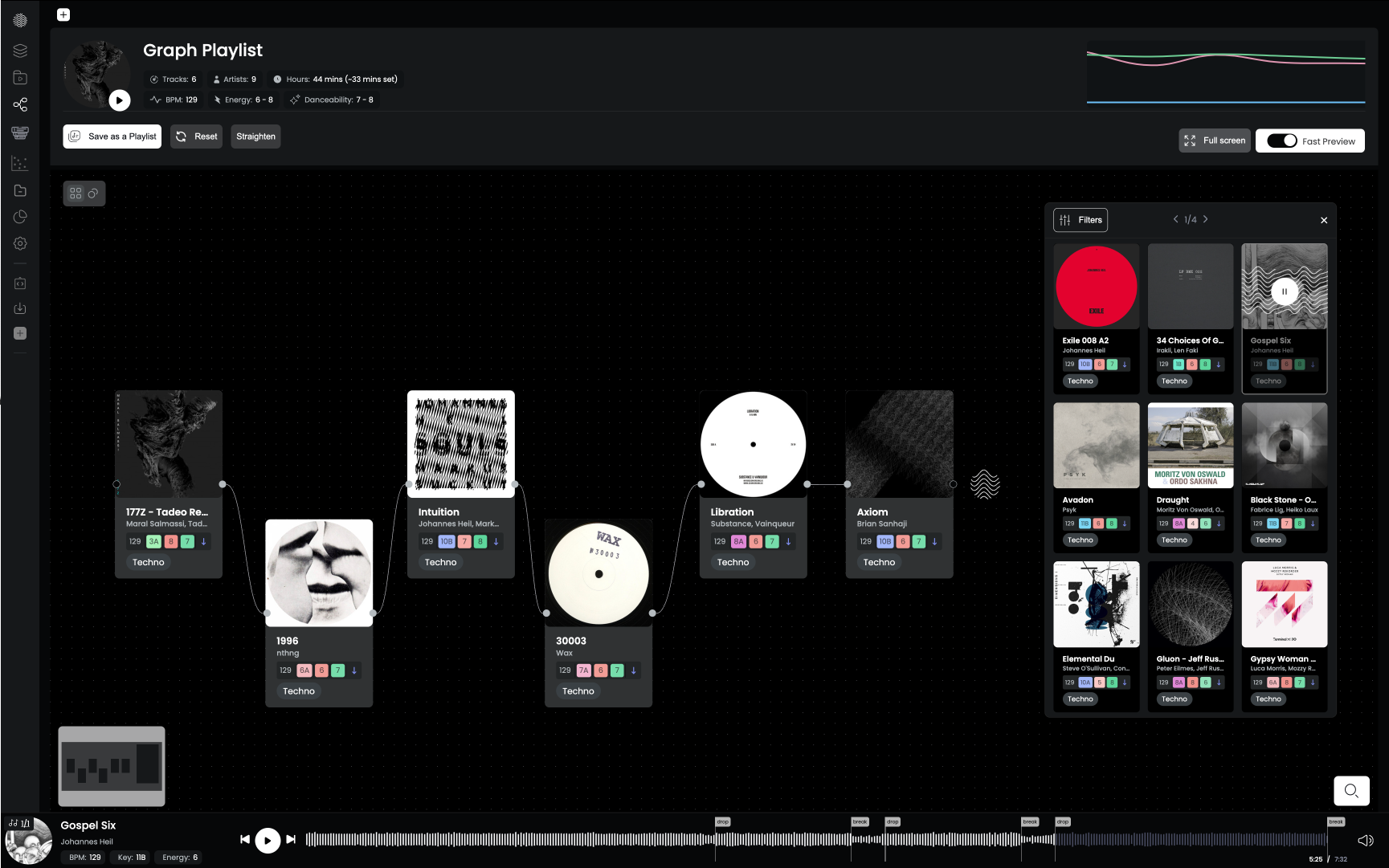
You can quickly preview candidates, compare them, and develop your playlist from the connections you discover.
The difference: Both tools can help identify matching tracks. Djoid makes exploring those relationships a central part of the creative playlist-building experience.
Djoid vs Lexicon: Feature Comparison
| What do you want to do? | Lexicon | Djoid |
|---|---|---|
| Clean and standardize metadata | Core strength | Basic metadata editing |
| Find duplicate files | Dedicated tools | Not a primary feature |
| Convert libraries between DJ platforms | Core strength | Supported import/export workflows |
| Back up your library | Dedicated tools | Not a primary feature |
| Build rule-based playlists | Smartlists | Filters and grouping |
| Generate automatic cue points | Yes | Yes |
| Analyze BPM, key, and energy | Yes | Yes |
| Identify genres | Genre cleanup and management | Audio-based genre and subgenre detection |
| Group similar music | Tags, rules, and Smartlists | Audio-based Auto Grouping |
| Find compatible tracks | Mixable Tracks | Matching Tracks and Graph Playlists |
| Explore your collection visually | Conventional library interface | Graph Playlists and Scatter Map |
| Plan a set around chapters and energy flow | Manual playlist preparation | Dedicated Chapter Builder |
| Automatically arrange musical progression | Playlist sorting tools | Magic Sort |
| Discover new music | Library-based discovery and charts | Context-aware Beatport Discovery |
| Prepare music for Rekordbox or Serato | Yes | Yes |
Both products continue to evolve, and the availability of individual features may depend on the subscription plan.
Which DJ Software Should You Choose?
Choose Lexicon if your main priority is library management.
Lexicon is a strong fit if you:
- Work across several DJ platforms and need reliable library conversion.
- Have a large collection containing duplicates or inconsistent metadata.
- Want to maintain cue points, playlists, and library information across systems.
- Need dedicated backup and file-management tools.
- Prefer organizing music through tags, filters, and automated rules.
If your biggest frustration is maintaining your music collection, Lexicon deserves serious consideration.
Choose Djoid if your main priority is music selection and creative preparation.
Djoid is a strong fit if you:
- Want to rediscover records buried in your collection.
- Spend hours searching for tracks that fit together.
- Want to explore your music through sonic similarity and visual relationships.
- Prepare long sets with intentional changes in energy and mood.
- Want to discover new Beatport records based on your existing sound.
- Care deeply about developing a distinctive musical identity through your selection.
Djoid is especially relevant for DJs who already have a substantial collection and want to get more creative value from the music they own.
If the biggest challenge is no longer collecting music, but deciding what to play, what belongs together, and how to shape your set, Djoid is built around those decisions.
Can Djoid and Lexicon Work Together?
Yes. The two applications can complement each other because they focus on different parts of DJ preparation. A practical workflow could look like this:
Step 1 — Maintain your library in Lexicon: Clean metadata, remove duplicates, organize files, and manage library compatibility.
Step 2 — Explore and curate in Djoid: Import your music, explore musical relationships, discover compatible records, and prepare your sets with Graph Playlists and Chapter Builder.
Step 3 — Prepare for performance: Export your curated selections into Rekordbox or Serato, check your preparation, and get ready for the gig.
The exact transfer workflow depends on the DJ software and data involved, so it is worth checking the supported import/export options before combining applications.
You don't necessarily need to choose one over the other.
Final Verdict: Library Management or Music Intelligence?
Lexicon and Djoid share a common goal: helping DJs get more value from their music collections. But they solve different primary problems.
Lexicon is built around maintaining your library. It excels at organizing files, managing metadata, converting between platforms, and keeping your collection consistent.
Djoid is built around understanding and curating your music. It focuses on discovering musical relationships, exploring collections visually, selecting compatible tracks, and shaping complete DJ sets.
Neither application replaces your taste, experience, or judgment as a DJ. And that's an important distinction.
Technology can help you discover possibilities, reduce repetitive work, and make better-informed selections. But the creative decisions remain yours.
Your music library is more than a collection of tracks. It's the foundation of your sound.
The real question is what you want to do with it.
Explore Djoid's Music Intelligence & Curation Tools >
Frequently Asked Questions
What is the main difference between Djoid and Lexicon?
Lexicon primarily focuses on DJ library management, maintenance, and compatibility between DJ platforms. Djoid focuses on music intelligence, visual exploration, discovery, and creative set preparation.
Does Lexicon offer music discovery and track matching?
Yes. Lexicon includes library-based discovery and Mixable Tracks features. Djoid differs in how discovery is integrated into visual curation, musical relationships, and the playlist or set you're preparing.
Is Djoid a replacement for Lexicon?
Not necessarily. Djoid overlaps with some library preparation features, but it is not intended to replace every aspect of Lexicon's dedicated library management and conversion tools.
Can Djoid help me find forgotten tracks in my library?
Yes. Graph Playlists, Matching Tracks, and Scatter Map help you explore musical relationships and find relevant records without relying exclusively on artist names, filenames, or folders.
Which tool is better for preparing DJ sets?
Both can support set preparation. Djoid offers dedicated creative workflows through Chapter Builder, Graph Playlists, and Magic Sort, making it particularly suitable for DJs who want to shape the energy, mood, and progression of a complete set.
Can Djoid recommend new music from Beatport?
Yes. Djoid's Beatport Discovery feature finds track candidates using your music library and the playlist you're currently working on as context. You can preview tracks and add music to your Beatport cart from inside Djoid.
Can I use both Djoid and Lexicon?
Yes. You can use Lexicon to maintain and organize your library, then use Djoid to explore musical relationships, discover music, and prepare creative sets, subject to supported import and export workflows.